Objections: Difference between revisions
| (One intermediate revision by the same user not shown) | |||
| Line 34: | Line 34: | ||
=Assessing objections in ReasonSpace= | =Assessing objections in ReasonSpace= | ||
To assess an objection, you have to assess all of the objections premises and the objecting inference (represented by the red octagon). You assess the premises, as you would assess any other premise, by determining its [epistemic status]. You assess the objecting inference considering how damaging the objection would be to the premise or inference objected 'if all of the objection's premises were certain'. | To assess an objection, you have to assess all of the objections premises and the objecting inference (represented by the red octagon). You assess the premises, as you would assess any other premise, by determining its [epistemic status]. You assess the objecting inference considering how damaging the objection would be to the premise or inference objected ''if all of the objection's premises were certain''. | ||
Assess the objecting inference in the right-most region of the assessment scale, if being certain of its premises would put you in a position to entirely reject the objection's target. (To entirely reject an premise is to regard it as [unfounded], and to entirely reject an inference is to regard it as a [non-sequitur].) On the opposite extreme, you should assess the objecting inference as a non-sequitur (in the left-most region of the assessment scale) if you found that being certain that the objection's premises were true would give you no reason to reject the objection's target. If you think that being certain of the objection's premises would give you some reason to doubt the objection's target, but not strong enough reason to reject it entirely, then assess the objecting inference somewhere in the middle two regions of the scale (depending on how strong you think the reason is). | |||
The system will calculate a strength for the objection as a whole based on the strengths you assign to the objection's premises and the objecting inference, and the system's assessment of the objection will then place an upper limit on the assessment of the objection's target. This limit will appear as a red shaded area at the right of the target's assessment scale. | |||
Latest revision as of 13:36, 22 August 2025
An objection is an argument that articulates a reason for rejecting another argument. It does this by objecting to one of the argument's premises or inferences. The objection as formulating as an argument a reason for giving the relevant premise or inference a low assessment.
In ReasonSpace an objection is represented by a red octagon with a red arrow pointing from it to the premise or inference that is being objected to. Each objection will have at least one premise, connected to it by black arrow (in the same way premises are connected to other arguments).
Objections to premises
An objection to a premise is an argument that the premise is unfounded (or otherwise week) and therefore is of no (or little) value in establishing any further conclusion. The objection can show this either by showing that the premise is false, or else by showing that we are in no position to know (or have any reason to believe) that it is true.
Here is an example of a map of an argument with an objection that one of the premises is false.
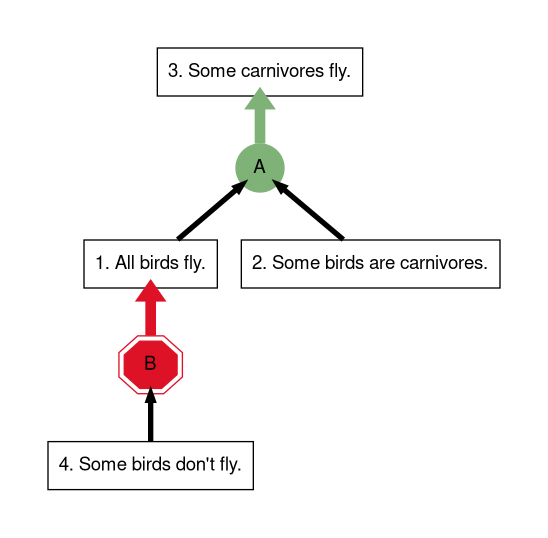
Of course, Proposition 4 is just the opposite of Proposition 1, so someone who believed this argument is likely to just reject Proposition 4 and be unmoved by this objection. So a more convicting form of the objection might give more of an argument against Proposition 4, rather than just asserting the opposite. Here's an example.
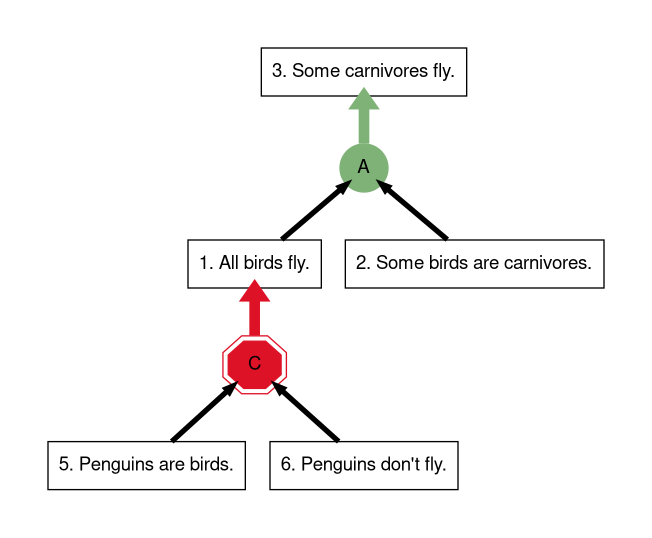
In these examples we argued that a premise is false. But a proposition doesn't have to be false to be unfounded or week. We just have to not be in a position to know that it's true. Here's a map that objects to a premise on these grounds.
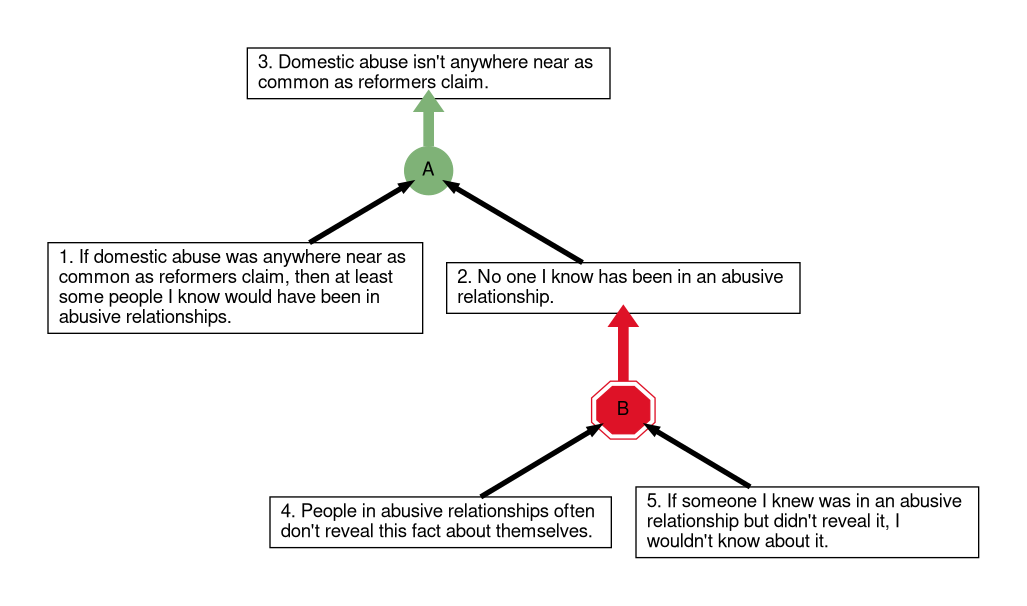
Objection B gives an argument that Proposition 2 is unknown. We could also have an objection that atterts this more directly, as in the map below:
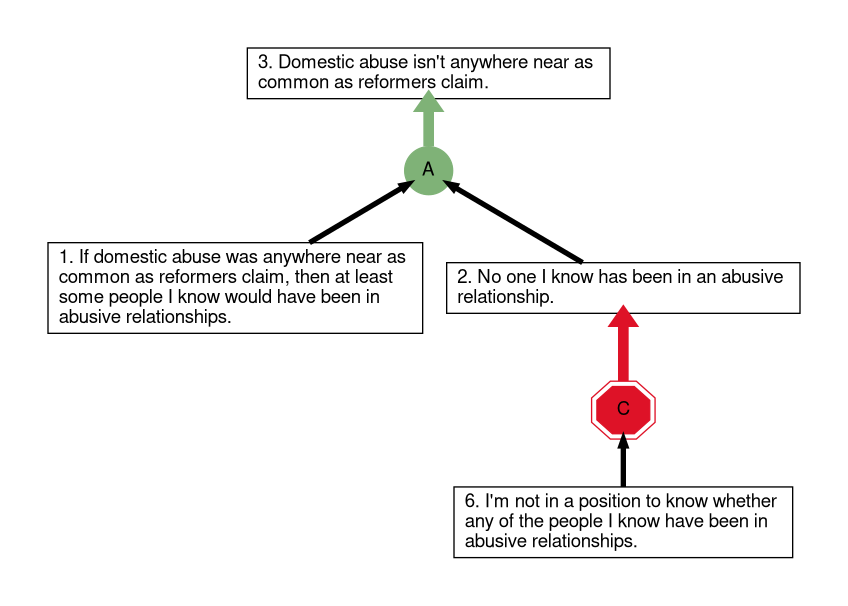
Objections to inferences
An objection to an inference is an argument that the inference is a non-sequitur, or (failing that) that it is not very strong. This means that it aims to show that even if one knew the premises of the inference to be true, the premises wouldn't give one a reason to think that the conclusion is true. Often such objections work by identifying the inference as a known fallacy. Here are two examples:
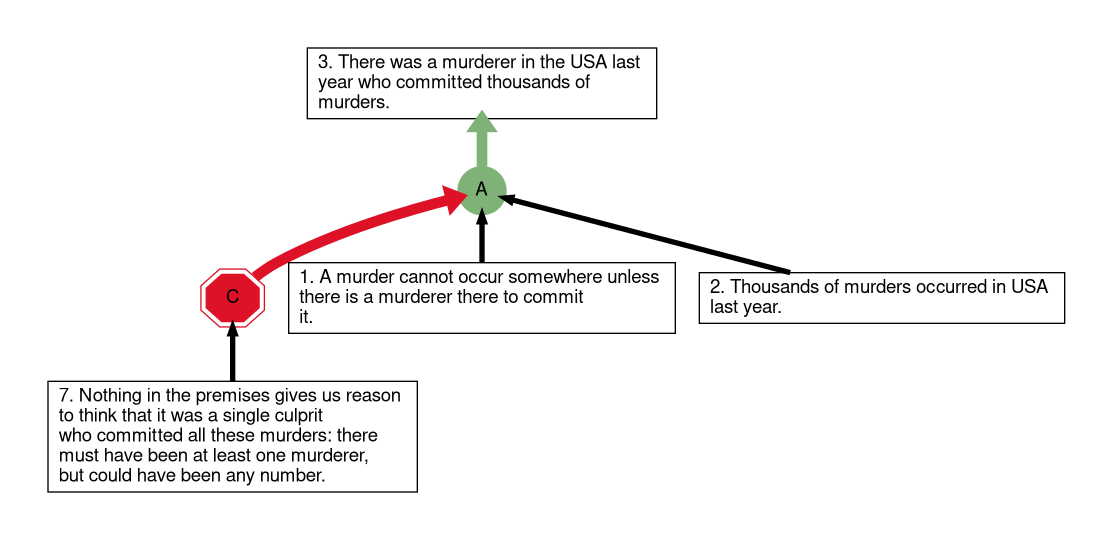
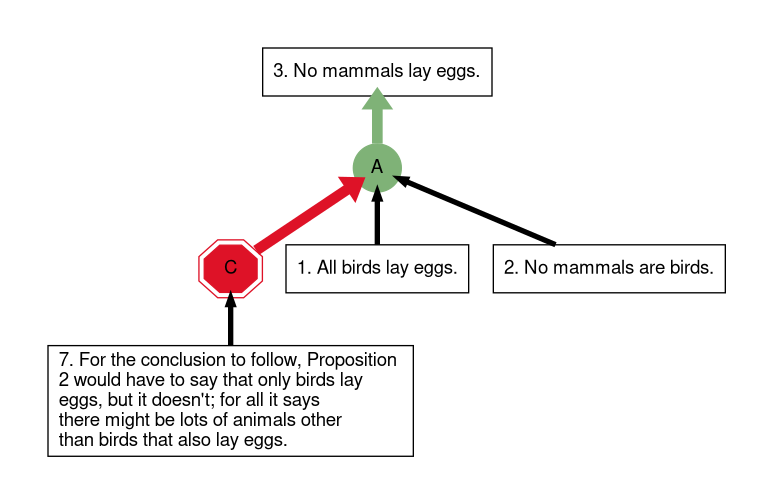
Assessing objections in ReasonSpace
To assess an objection, you have to assess all of the objections premises and the objecting inference (represented by the red octagon). You assess the premises, as you would assess any other premise, by determining its [epistemic status]. You assess the objecting inference considering how damaging the objection would be to the premise or inference objected if all of the objection's premises were certain.
Assess the objecting inference in the right-most region of the assessment scale, if being certain of its premises would put you in a position to entirely reject the objection's target. (To entirely reject an premise is to regard it as [unfounded], and to entirely reject an inference is to regard it as a [non-sequitur].) On the opposite extreme, you should assess the objecting inference as a non-sequitur (in the left-most region of the assessment scale) if you found that being certain that the objection's premises were true would give you no reason to reject the objection's target. If you think that being certain of the objection's premises would give you some reason to doubt the objection's target, but not strong enough reason to reject it entirely, then assess the objecting inference somewhere in the middle two regions of the scale (depending on how strong you think the reason is).
The system will calculate a strength for the objection as a whole based on the strengths you assign to the objection's premises and the objecting inference, and the system's assessment of the objection will then place an upper limit on the assessment of the objection's target. This limit will appear as a red shaded area at the right of the target's assessment scale.